
Dear Parents and Guardians of Watervliet Public Schools bus riders:
Watervliet school buses are now equipped with GPS technology that may benefit your household. The WheresTheBusTM parent app lets you know precisely when your child’s bus will arrive at your bus stop. This app is free to all Watervliet bus riding households. The system also helps Transportation efficiently manage our bus fleet.
To use the WheresTheBusTM app, download the WheresTheBusTM app from the App Store (iOS / Apple) or Google Play Store (Android). You will be prompted to create an account. Select Watervliet from the dropdown menu and provide your student’s information. Once your student’s information is verified, you will create an account and will be able to log in and access the app.
Additional information on the WheresTheBusTM parent app is included below. I encourage you to try this exciting new technology, as we continually strive to provide you with the best possible transportation service.
Sincerely,
Alan Berget
Watervliet Public Schools
Director of Transportation
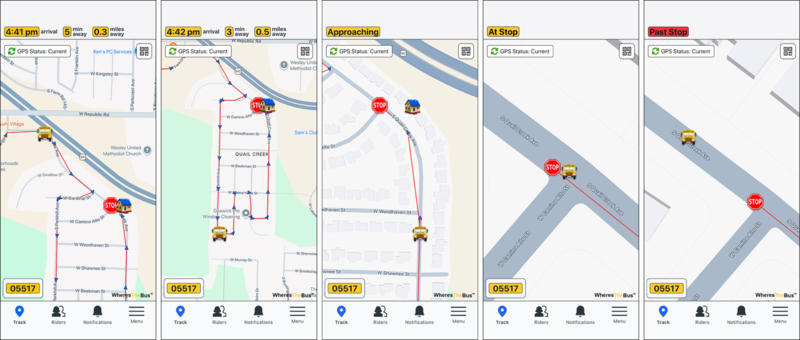
WheresTheBusTM lets you know precisely when your bus will arrive at your bus stop, providing up-to-the-minute arrival time and bus location information.
Access WheresTheBusTM from any Internet enabled device (smartphone, tablet, PC, iPod).
Apple iOS and Android apps are available.
Avoid the weather and wait for the bus in the comfort of your own home.
Eliminate the stress of rushing to the bus stop and wondering where the bus is.
Parent app time progression (actual screen shots):
The WheresTheBusTM app is free to Watervliet households, simple, and takes less than 5 minutes to set up.
To sign up:
Download the WheresTheBusTM app from the App Store (iOS / Apple) or Google Play Store (Android).
You will be prompted to create an account.
Select Watervliet from the dropdown menu and provide your student’s information.
Once your student’s information is verified, you will create an account.
Log in to the app and access real-time bus information for your student(s).